Getty
Provenance Index Databases -
Guide
http://piweb.getty.edu
I. Database scope and coverageII. Search tipsIII. Sample searches |
I.
Database scope and coverage |
||
| Database sets or pairs: (In all three categories, database b is a subset of database a. There are numerous linked cross-references from database a to database b and vice-versa. Look for clickable links throughout your results and within retrieved records.) | ||
| 1) Archival Documents: | ||
| a. Document Descriptions: Descriptive information, such as owner, life dates, document date and residence, about 16th to 19th Century documents that inventory French, Italian, Netherlandish or Spanish collections of art. b. Document
Contents: Descriptive information, such as artist, title and
subject, about individual works of art from a portion of the documents
recorded in the Document Descriptions database. |
||
| 2) Sale Catalogs: | ||
| a. Sale Descriptions: Descriptive information, such as auction date, sale location, seller and existent catalog copies, about early 19th Century Belgian, British, French and Netherlandish auction catalogs, and 17th and 18th Century German, French and Scandinavian auction catalogs. This database functions much like SCIPIO and Lugt’s Répertoire online, providing catalog information and catalog copy location. b. Sale Contents: Descriptive information, such as auction date, lot number, artist, title, buyer and seller, about paintings from auction catalogs recorded in the Sale Descriptions database. This database functions like an art auction index, describing individual items in an auction catalog. |
||
| 3) Public Collections: | ||
| a.
Public Collections: Descriptive information, such as artist,
title, subject and current location, on paintings, executed by artists
born before 1900, in a selection of American and British public institutions. b. Provenance of Paintings: Information on the provenance (various owners, auction sales, current location) of a portion of the paintings in the Public Collections database. |
||
| ***Please Note: There is no 20th-century information in the Archival Documents or Sale Catalogs databases, and very little from the second-half of the 19th Century. Archival Documents contains information from approximately 1550-1850, and Sale Catalogs from approximately 1650-1840. The Public Collections database has 20th century provenance information for paintings in public collections. | ||
| Top | ||
| II. Search tips | ||
Boolean
Searching: AND is the default search, so
that all search terms are automatically supplied with “and” between
them. |
||
o Searching for Madonna of Humility with Saint Catherine in the Keywords field will retrieve more results since it will look for your terms in all record fields. o Searching for Madonna of Humility with Saint Catherine in the Painting Title field should retrieve an exact match. o
It
is also possible to do a title keyword search in the Painting
Title field. E.G. a search on Madonna humility in Painting
Title will retrieve all records where these two keywords are present
in the painting’s title. |
||
| Date Searching: | ||
o To search by year and month: yyyy/mm* (1689/10*) o To search by year: yyyy* (1738*) o
To
search by year range: yyyy:yyyy (e.g. to search for
the entire 17 Century
= 1600:1699) |
||
Name Searching: All name fields in the Getty Provenance databases are keyword
searchable. Hence, you can type in a first and/or last name in any
order. E.G. Sofonisba Anguissola or Anguissola Sofonisba
or Sofonisba or Anguissola. Do not use a comma to separate first
and last name. |
||
| Subject Searching: | ||
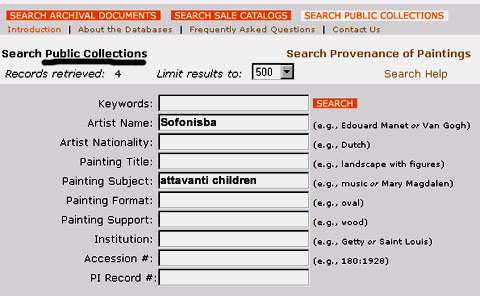
o A subject search is only possible in the Archival Documents and Public Collections database. o Getty uses Iconclass subjects. A browseable subject index or list of headings is not available. o The subject field, like other fields, is keyword searchable with an implicit “and” between keywords. o
See
the screen shot below for a search in the Public Collections
database on Artist name: Sofonisba and Painting Subject:
Attavanti children. |
||
 |
||
| Keyword Searching: | ||
| The Keyword field searches for terms almost anywhere in the bibliographic record. | ||
| Top | ||
| III. Sample searches | ||
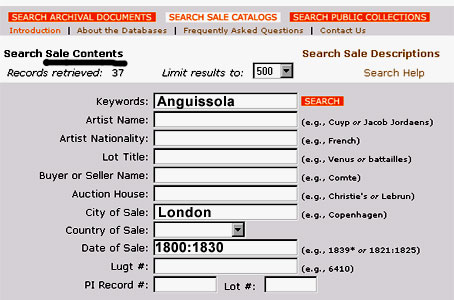
| A)
Example of a search in the Sale Contents database: Query: What works by Anguissola were sold in London in the early 19th Century? |
||
 |
||
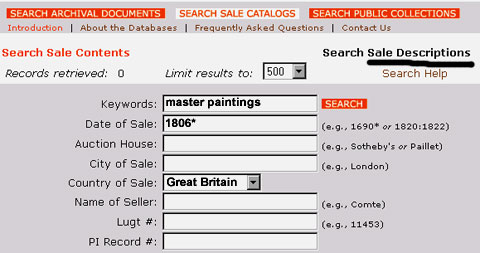
| B)
Example of a search in the Sale Descriptions database: Query: Was there a sale of old master paintings in Great Britain in 1806? |
||
 |
||
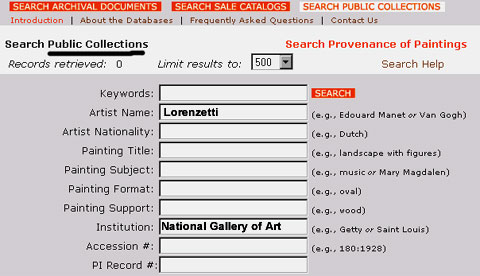
| C)
Example of a search in the Public Collections database: Query: Does the National Gallery of Art have any paintings by Pietro Lorenzetti? |
||
 |
||
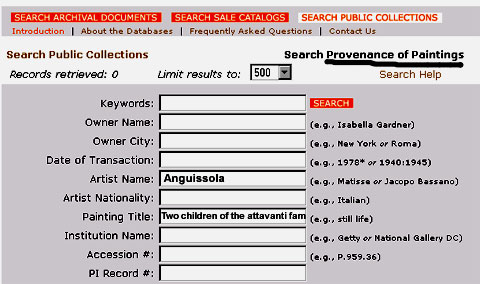
| D)
Example of a search in the Provenance of Paintings database: Query: What is the provenance of Sofonisba Anguissola’s Two Children of the Attavanti Family? |
||
 |
||
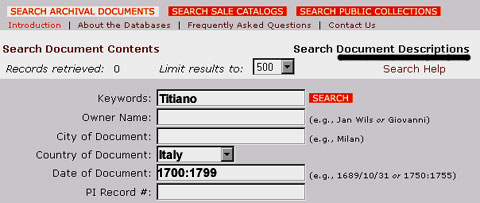
| E)
Example of a search in the Document Descriptions database: Query: Are there Italian archival inventories from the 18th Century that mention Titiano? |
||
 |
||
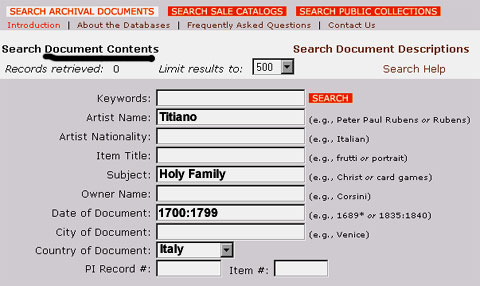
F) Example of a search in the Document Contents database: Query: Are there any paintings by Titiano of the Holy Family that are listed in Italian inventories of the 18th Century? |
||
|
||
| Top | ||